Frame / Portfolio — UX Engineer

Amanda Lonestar

I design the experience and ship the code. Twelve years turning business needs into accessible, usable products, from Figma to production.

UX Engineering Digital Product Web Experience Accessibility
Experience
12+ yrs
Stack
React · TS · Next.js
Standard
WCAG 2.1 AA · 508
This text contrast
—AA

Selected work

Problems I've owned end to end

Migration · IA · RedesignCity of Tracy

City of Tracy website

Led the migration of three city websites to one platform, including 400+ pages on the main site. Rebuilt the navigation and redesigned 12 department main pages around what residents come to do.

Read the case study →
Civic web · IACity of Tracy

Tracy Police Department website

Migrated 80+ pages and built 8+ reusable templates so residents can find who's in charge and what each team does.

Read the case study →
Service design · AccessibilityCity of Tracy

Public Records Requests

Redesigning a legal process page around one clear path: request online, know what happens next, and see the fees up front.

Read the case study →
Accessibility · TrainingCity of Tracy

Making three city websites accessible by default

Led WCAG 2.1 AA initiatives across Granicus OpenCities sites, set reusable patterns and content structures, and trained 20+ department publishers on accessible content and metadata.

Data · NavigationCity of Tracy

Letting analytics redraw the homepage

Used Google Analytics and engagement data to rework homepage navigation, calls to action, and AI chatbot prompts so residents reach city services faster.

Design system · RebrandMedallia

Bringing a design system through a rebrand

Helped integrate Medallia's design system across the product during a major rebrand: reusable React components, consistent visuals, and accessible interaction patterns.

Compliance · AuditSAP

Passing external accessibility audits

Implemented WCAG and Section 508 standards across multiple SAP applications, earning VPAT certification through third-party audits.

How I work

One person across the handoff

Discover & define

Sit with stakeholders, find the real user need, and turn it into requirements a team can build against.

  • Requirements
  • User flows
  • IA

Design & prototype

Wireframes to high-fidelity Figma, built on design-system thinking so the next screen is faster than the last.

  • Figma
  • Prototyping
  • Design systems

Build & measure

Responsive, accessible front ends in React and TypeScript, then analytics to decide what to change next.

  • React
  • TypeScript
  • GA

Experience

Civic, enterprise, and startup

  1. NowAug 2025 – Present

    City of Tracy

    Digital Communications Designer / Webmaster

    Leading UX strategy and website management for three major municipal websites, with a fourth on the way.

    • Led the migration of three city websites to Granicus OpenCities: the main city site (400+ pages, 12 redesigned department pages, launched January 2026), plus the police and economic development sites (launched October 2026).
    • Partner with department leadership to define needs and build digital solutions that improve access to city services.
    • Design user flows, wireframes, dashboards, and responsive layouts from stakeholder requests.
    • Set accessibility standards and train 20+ departmental publishers.
  2. Co-founderOngoing

    Talyi

    Co-founder

    Building an AI-powered B2B SaaS product for automotive workforce management.

  3. 3 yr 8 moMay 2021 – Jan 2025

    Medallia

    Senior Front-End Engineer

    • Led end-to-end UX and front-end development for enterprise features, from Figma mockups to React and TypeScript.
    • Worked with PMs, designers, and engineers in discovery to evaluate solutions.
    • Contributed to documentation, accessibility standards, and front-end practices across teams.
  4. 5 yrMay 2016 – May 2021

    SAP

    UI/UX Engineer

    • Built front-end components from UX specs and wireframes.
    • Achieved VPAT certification through external WCAG and 508 audits.
    • Refined workflows and interactions with UX teams in Adobe XD and Sketch.
  5. 2 yr 9 moAug 2013 – May 2016

    The Myers-Briggs Company

    Web Producer

    • Managed the corporate SharePoint site for consistency, accessibility, and brand alignment.
    • Built SEO-optimized landing pages and responsive email templates for launches.

Toolkit

What I reach for

UX & Product

UX/UI design, user flows, wireframing, prototyping, requirements gathering, information architecture

Development

React, TypeScript, JavaScript, Next.js, HTML, CSS

Digital Experience

Website management, CMS platforms, SEO, Google Analytics

Accessibility

WCAG 2.1 AA, Section 508, accessible design, VPAT

Tools

Figma, Adobe Creative Cloud, Sketch, Granicus OpenCities

B.A., Web Page, Digital/Multimedia & Information Resources DesignCal State East Bay · 2011–2013
UX Design certificateGeneral Assembly · 2018
Front End Web Development certificateGeneral Assembly · 2016
A.A.Golden West College · 2009–2010
Amanda Lonestar
Amanda LonestarUX Engineer · Designer who codes

Contact

Have a product that needs both halves?

← All work

Case study / Citywide redesign

City of Tracy website

Leading the migration of three city websites onto Granicus OpenCities, starting with the main city site: restructuring its navigation and redesigning every department's main page so residents land on tasks instead of mission statements.

Role
Project lead: migration, IA & page design
Platform
Granicus OpenCities
Partners
OpenCities CMS team, city departments
Launched
January 2026
  • 400+pages migrated to the new platform
  • 12department and division main pages redesigned
  • Jan 2026launch, five months after I was hired to lead it

One platform, three sites

City of Tracy
Launched Jan 2026
Tracy Police Department
Launched Oct 13, 2026
Think Inside the Triangle (economic development)
Launched Oct 13, 2026
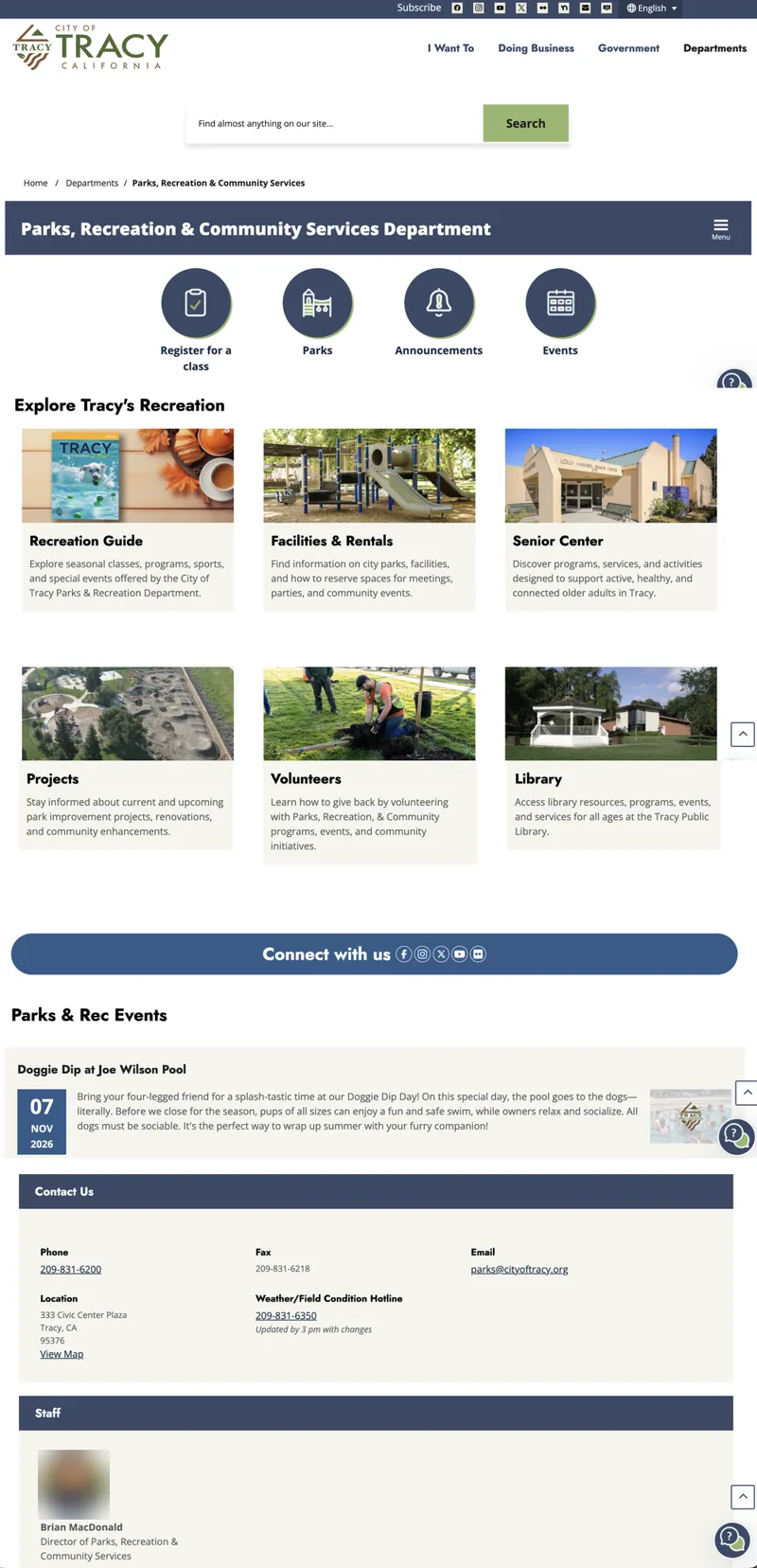
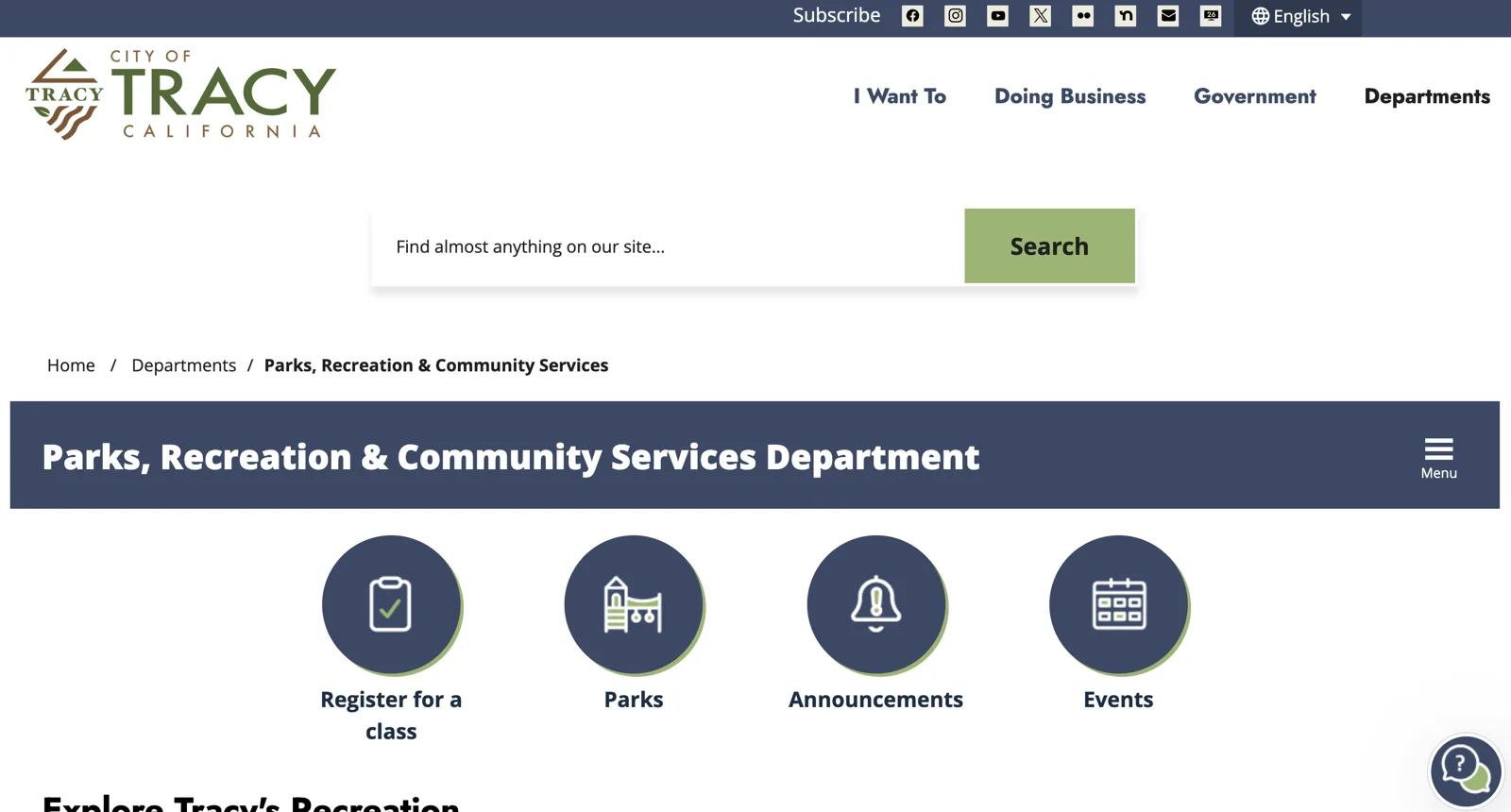
Redesigned Parks, Recreation and Community Services page: site header with I Want To, Doing Business, Government, and Departments; a search bar; breadcrumb; a department banner with a Menu button; and four round quick-action buttons for Register for a class, Parks, Announcements, and Events
00Parks department page, after

The problem

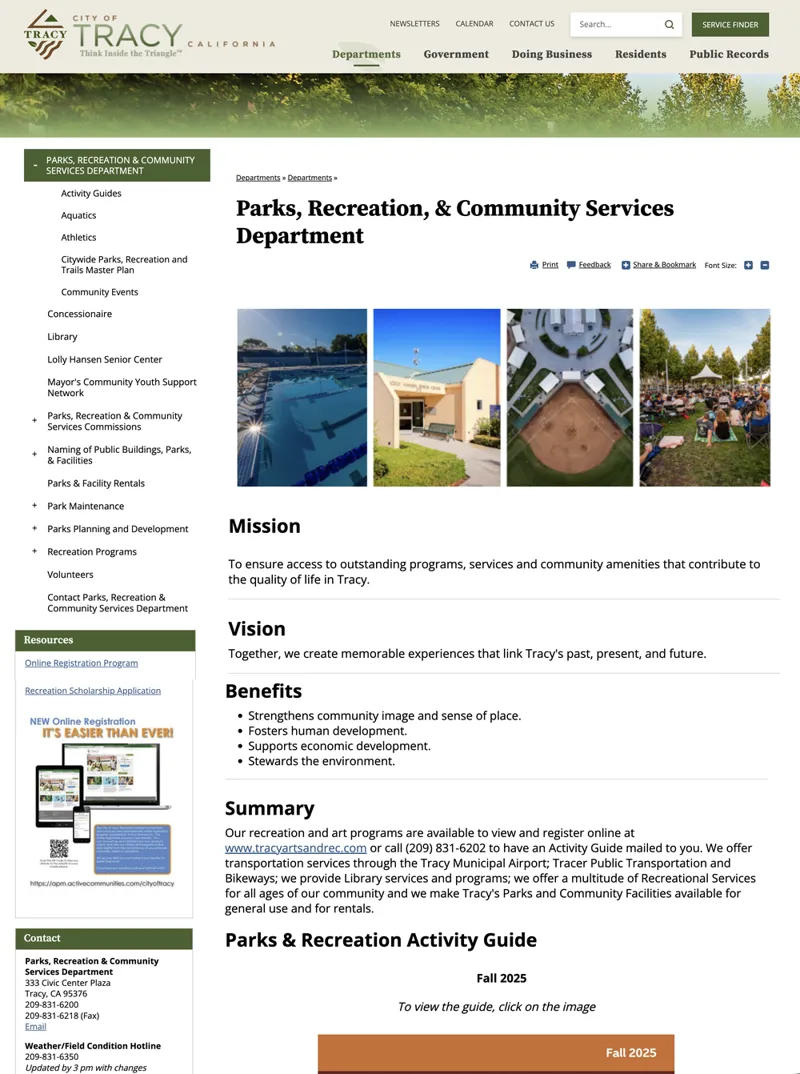
The old site was organized like an org chart. The Departments menu listed fifteen entries in one long column, with divisions sitting beside the departments they belong to. Department pages opened with mission, vision, and benefits statements, and the things people actually came to do were scattered through paragraphs and sidebars.

The migration to a new platform was the chance to fix the structure, not just move the content.

Before / after · Navigation
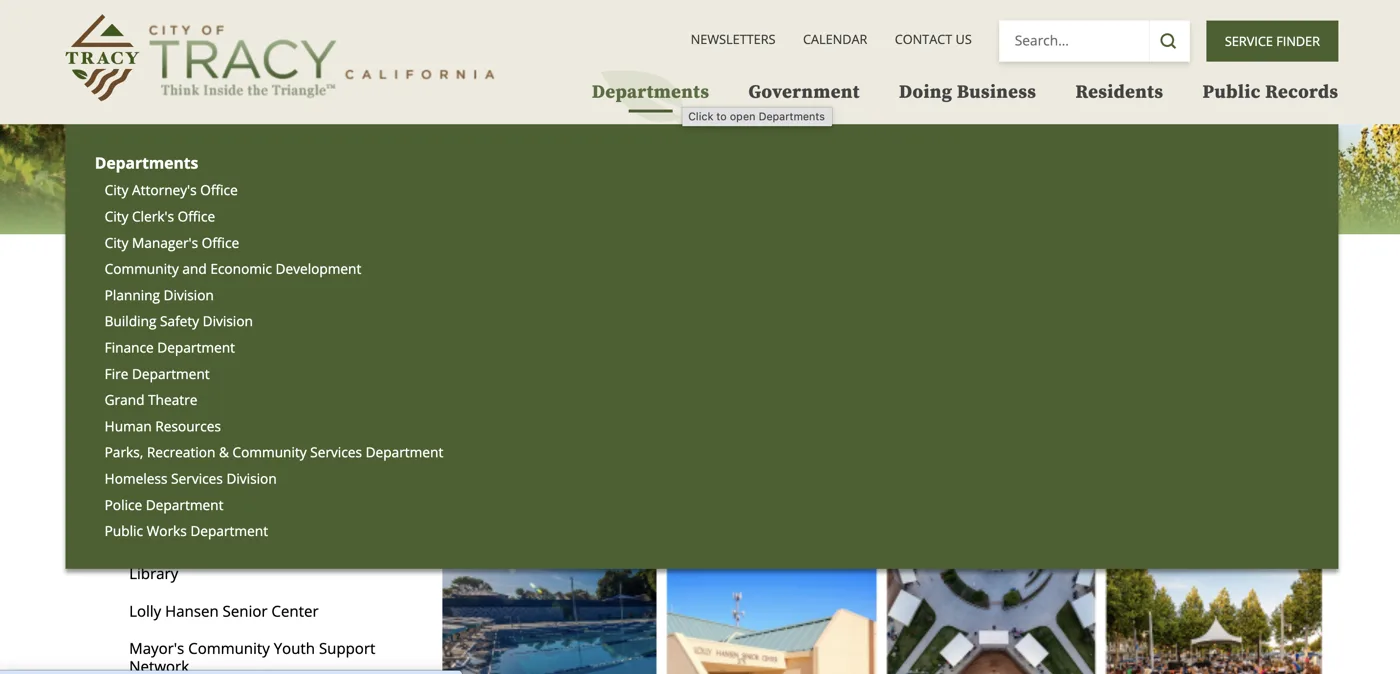
Old Departments menu: a single green column of fifteen links mixing departments and divisions
Before15 entries, one column
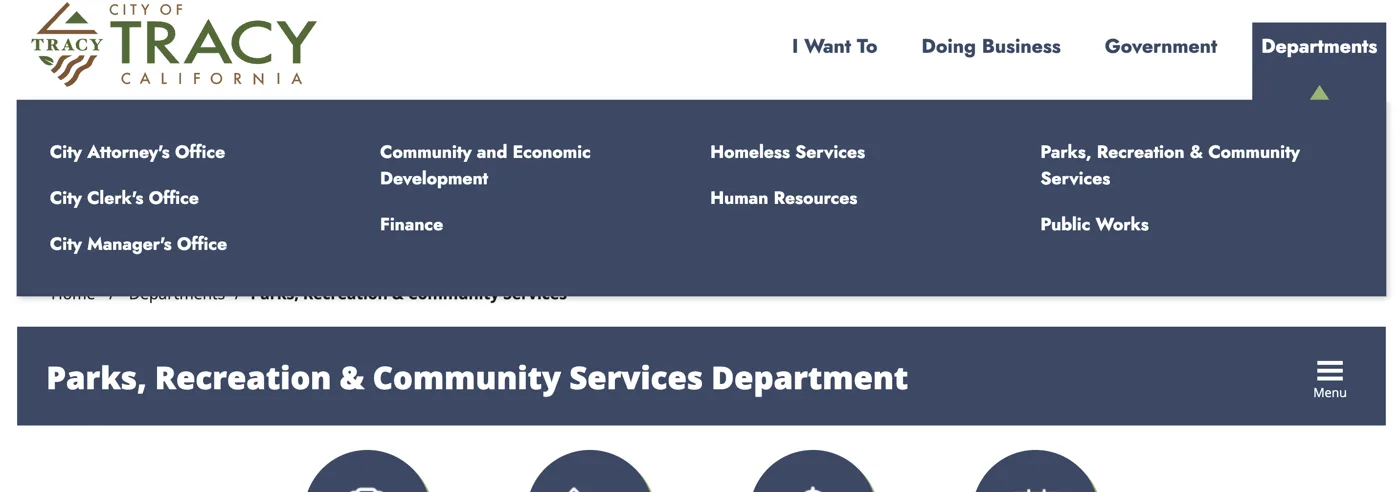
New Departments menu: ten departments in four columns on a navy panel
After10 departments, four columns
  • 15 entries down to 10Community and Economic Development now holds three divisions, including Planning and Building Safety, that used to sit at the top level. Fire left the menu because it's no longer a city department, and Police is reached through "I Want To".
  • Scannable at a glanceFour short columns replace one long list, so the whole menu fits in a single view.
  • Tasks get a front door"I Want To" leads the main navigation for people who know what they need but not which department handles it.

Before / after · Department page

Parks, Recreation & Community Services

Old Parks page, full length: a long left menu, a photo strip, then Mission, Vision, Benefits, and Summary text sections, with contact details in a sidebar
BeforeFull page
New Parks page, full length: four quick actions, an Explore Tracy's Recreation grid of six photo cards, a Connect with us bar, an events feed, a structured Contact Us panel, and a staff card
AfterFull page
  • Tasks firstRegister for a class, Parks, Announcements, and Events sit right under the page title instead of below a mission statement.
  • Explore by what you wantSix photo cards with one-line descriptions replace the mission, vision, and benefits text blocks.
  • Live contentAn events feed with clear date tiles keeps the page current without manual edits.
  • Contact you can scanPhone, email, location, and the field-conditions hotline moved from a sidebar into a labeled grid.

System

One pattern for every department

Parks is one example. Every department main page follows the same structure: a banner with the section menu, quick actions, explore cards, live content, contact, and staff. Residents learn the pattern once and it works everywhere on the site.

The same approach shaped the Public Records Requests page.

01Department page pattern
← All work

Case study / Civic web

Tracy Police Department website

Building the operations section of the department's new website so residents can find a bureau, a specialized unit, or the person in charge in two or three clicks.

Role
UX design & build
Platform
Granicus OpenCities
Scope
Bureaus, units, K9, staff, chiefs history, Instagram feed
Launched
Oct 13, 2026
  • 80+pages migrated to the new site
  • 8+reusable content templates for bureaus, units, and staff
  • Oct 13launched in 2026
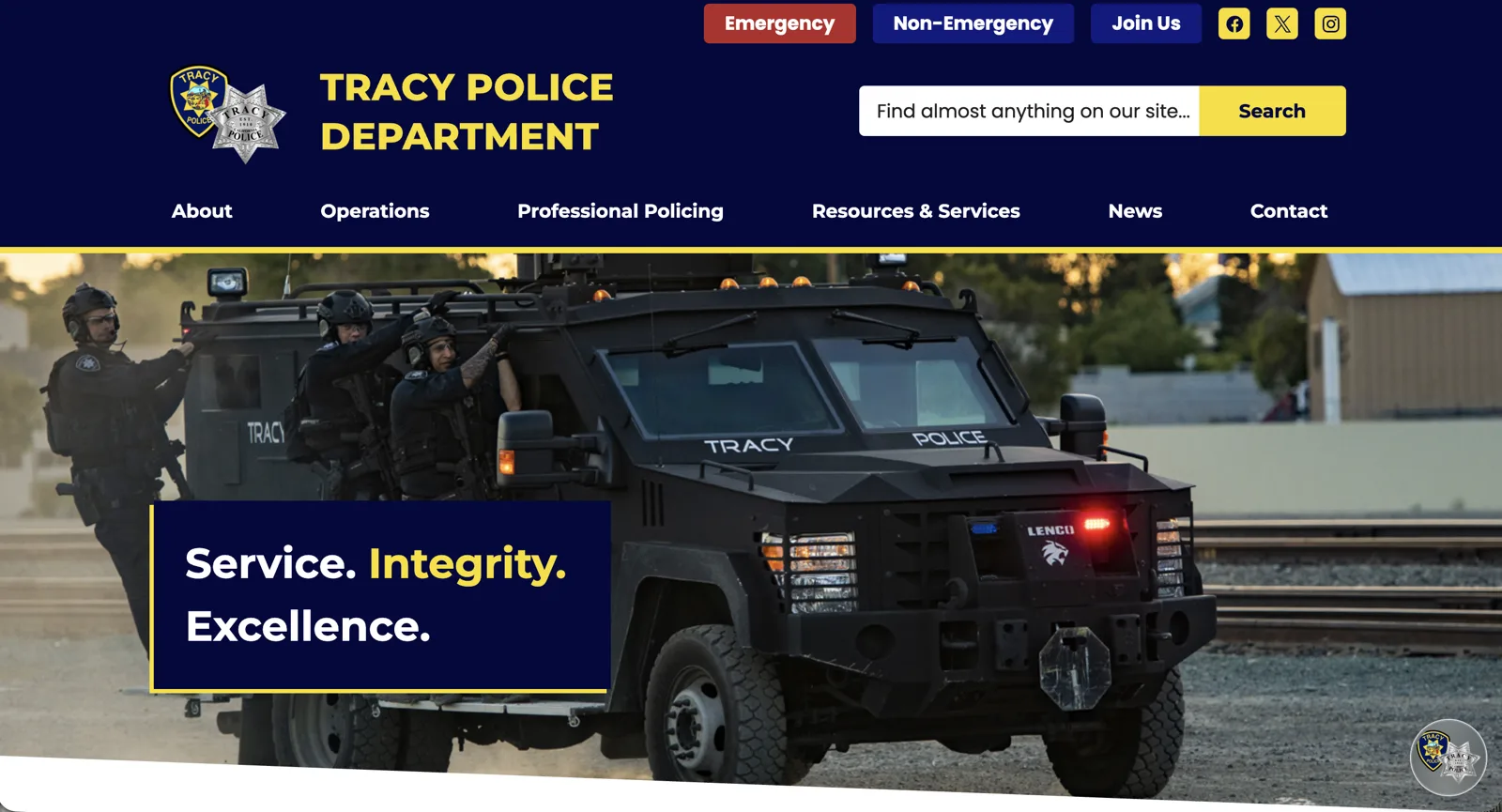
Tracy Police Department homepage: navy header with Emergency, Non-Emergency, and Join Us buttons, site search, main navigation, and a hero photo of the tactical team with the tagline Service. Integrity. Excellence.
00Homepage

The problem

A police department is organized as bureaus, divisions, and units. Residents don't think that way. They want to know who runs patrol, what the K9 team does, or how to reach someone without calling 911.

The job was to migrate the department's operations content into the new OpenCities site with a structure that matches the org chart for staff, but stays easy to scan for the public.

Before / after
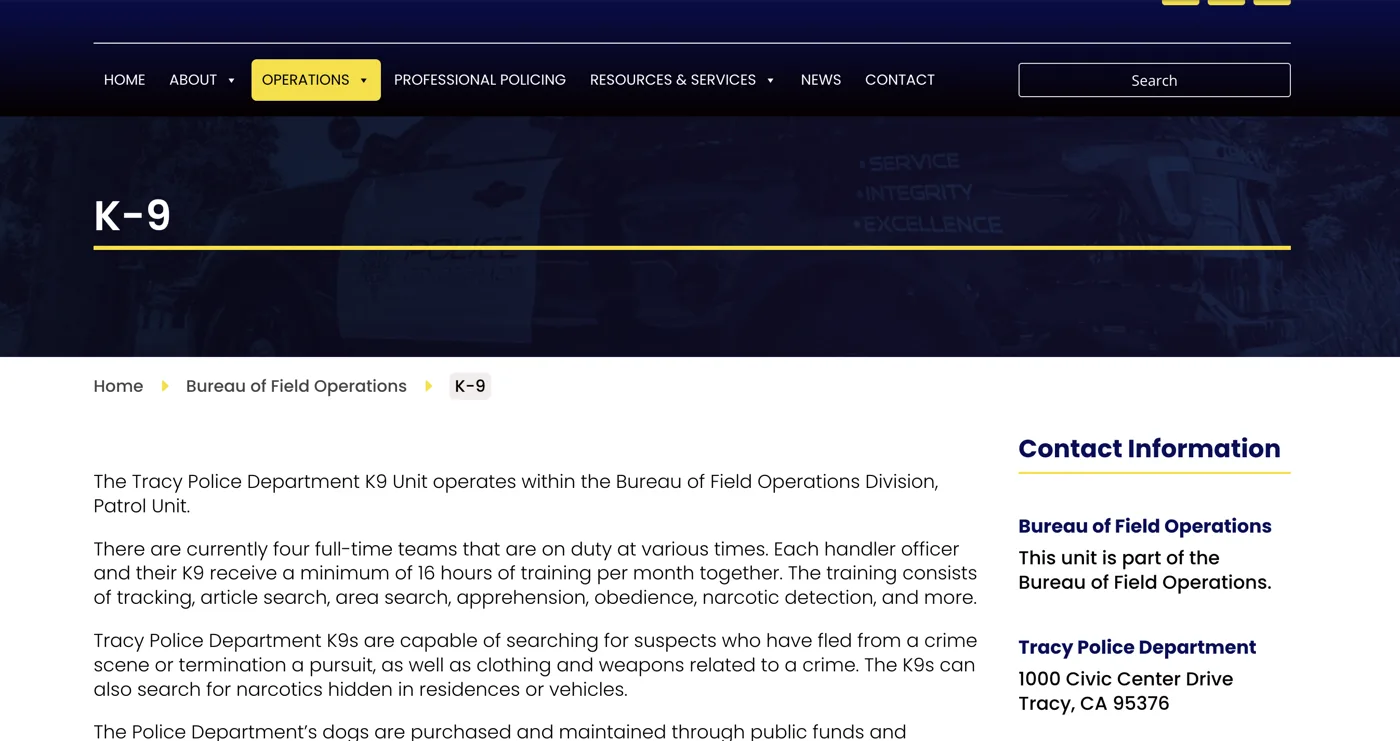
The same K-9 page, old site and new

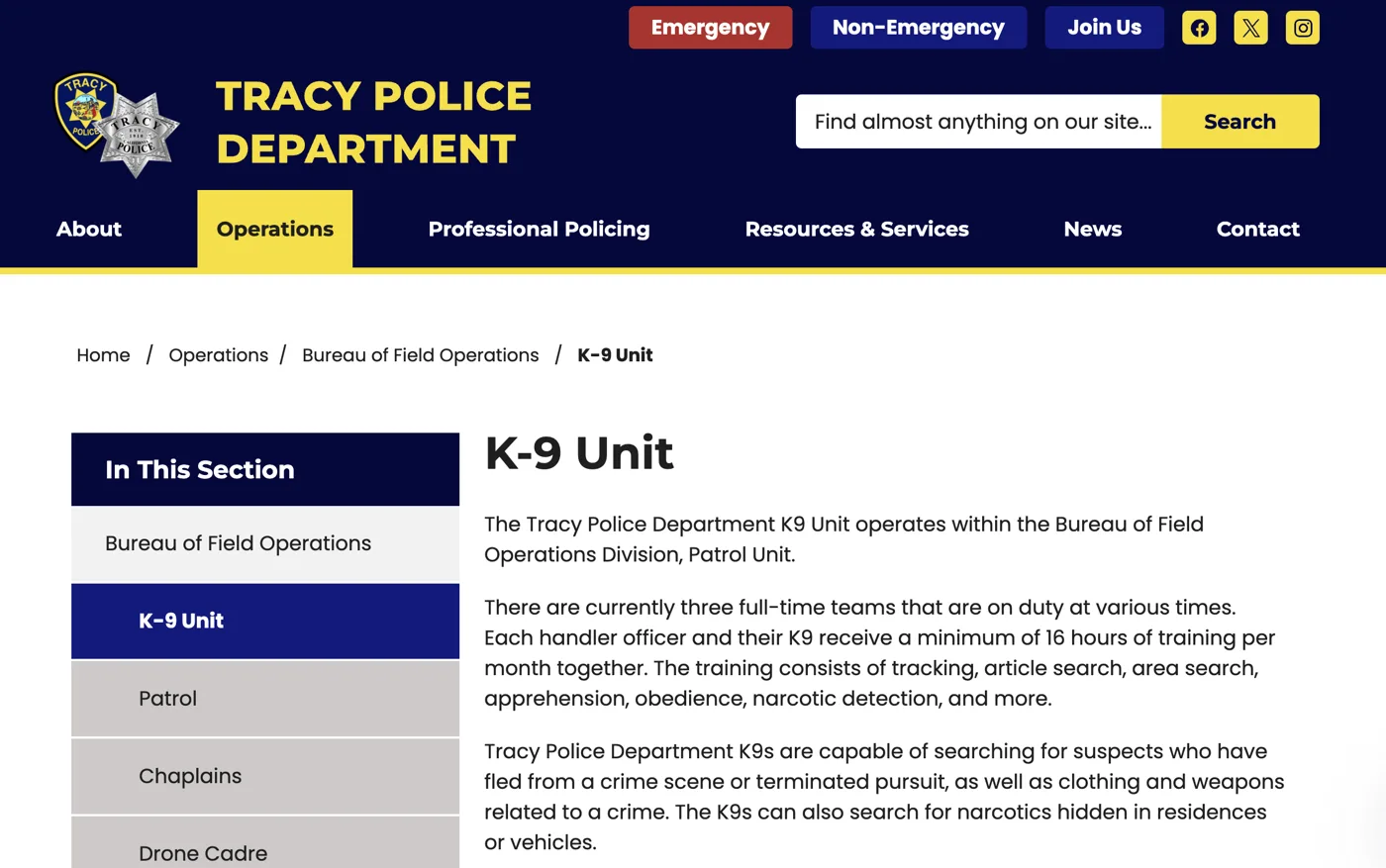
Old K-9 page: tall dark banner with the page title, a breadcrumb that skips Operations, body text starting below the fold, and a contact sidebar with no section navigation
BeforeOld site
New K-9 page: title and body text near the top, full breadcrumb, and an In This Section menu listing the bureau's units
AfterNew site
  • Content moves upThe decorative banner is gone, so the title and first paragraph sit at the top of the screen instead of below it.
  • The full path is visibleThe breadcrumb now includes Operations, and a section menu shows every sibling unit in the bureau.
  • Copy got a passContent was reviewed during migration, including fixing a typo in the unit description ("termination a pursuit").

Top tasks

Start with what people came to do

Emergency and non-emergency contacts sit at the very top of every page. Right under the homepage hero, a "How Do I" tab puts the most common tasks first: filing a report, requesting records, animal services, alarm permits. News, events, and bureaus are one tab away.
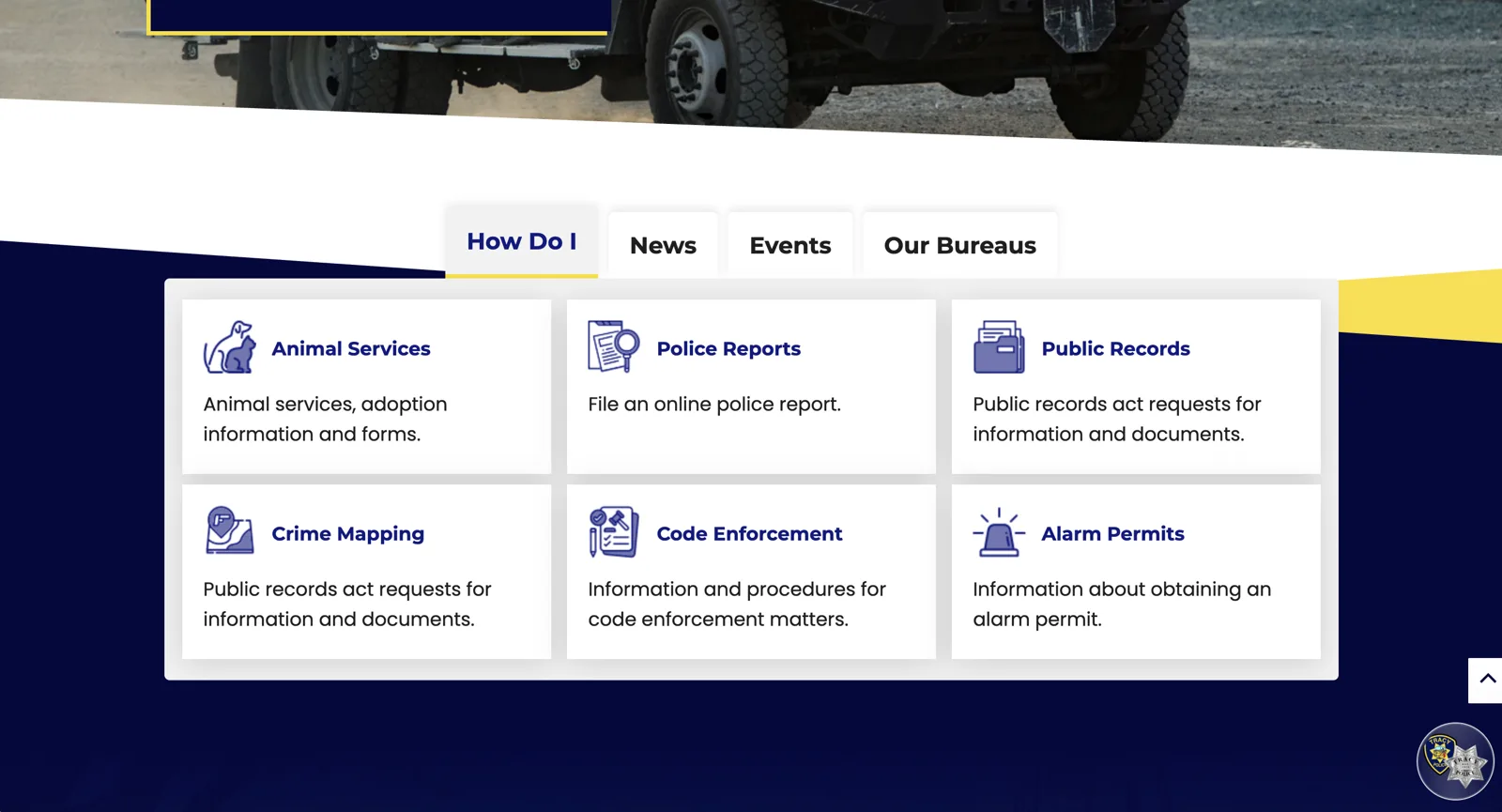
Homepage How Do I tab showing six task tiles with icons: Animal Services, Police Reports, Public Records, Crime Mapping, Code Enforcement, Alarm Permits
01"How Do I" task tiles

Wayfinding

Show people where they are

Every page carries a breadcrumb and an "In this section" menu. Units are indented under their bureau and the current page is highlighted, so the hierarchy is visible without a diagram.

K-9 Unit page with breadcrumb Home / Operations / Bureau of Field Operations / K-9 Unit and a section menu highlighting K-9 Unit under its bureau
02Breadcrumb + nested section menu

Accountability

Lead with who's in charge

Bureau pages open with the commander's card: name, title, address, the non-emergency line, and a message link. That answers the most common reason someone lands on the page before they read a paragraph.
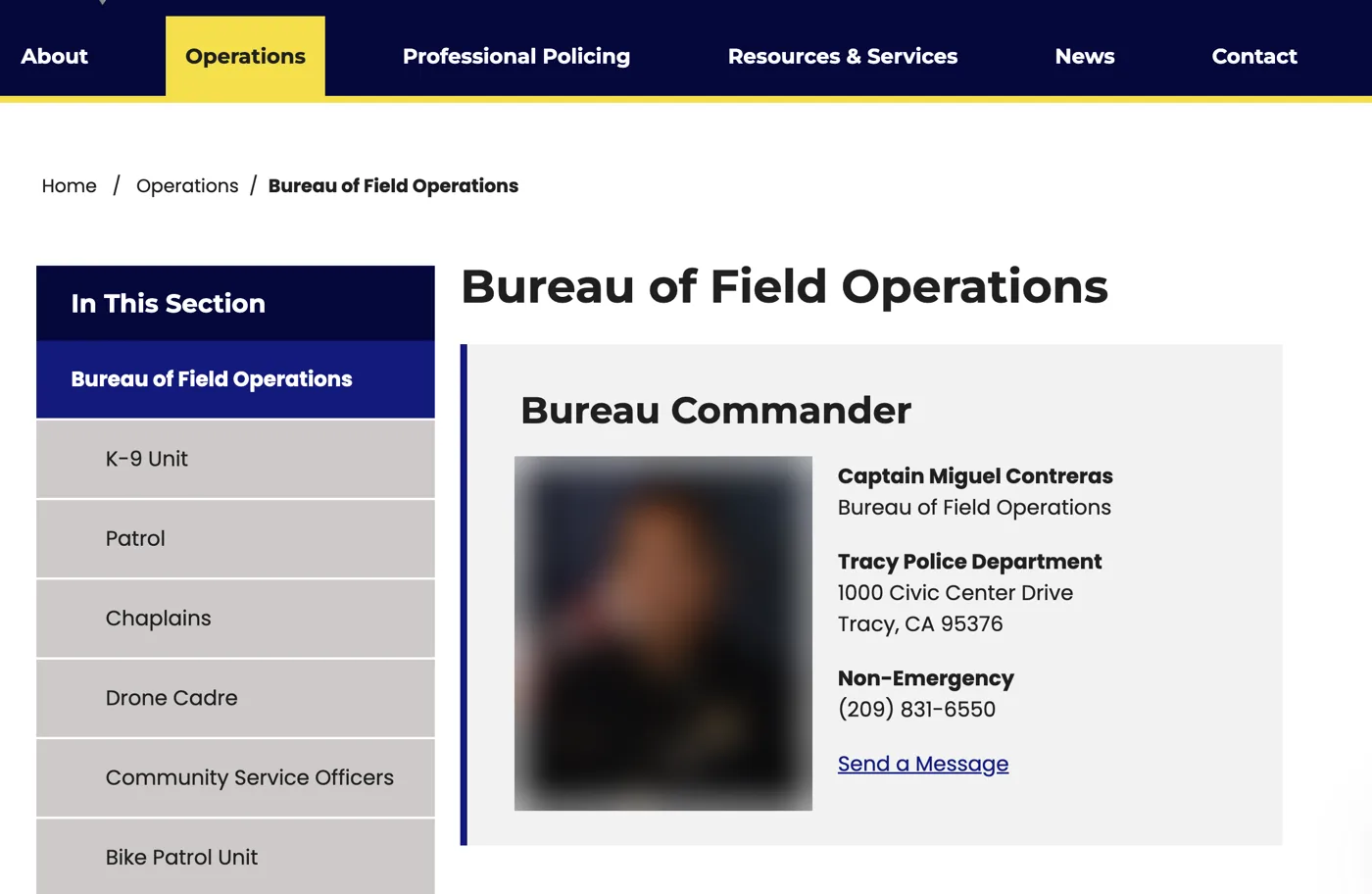
Bureau of Field Operations page opening with a Bureau Commander contact card next to the section menu
03Commander card leads the bureau page

Navigation

Fan out to the units

Below a short overview, each bureau lists its units as a grid of large tiles. They're big touch targets on a phone and a quick scan on desktop.
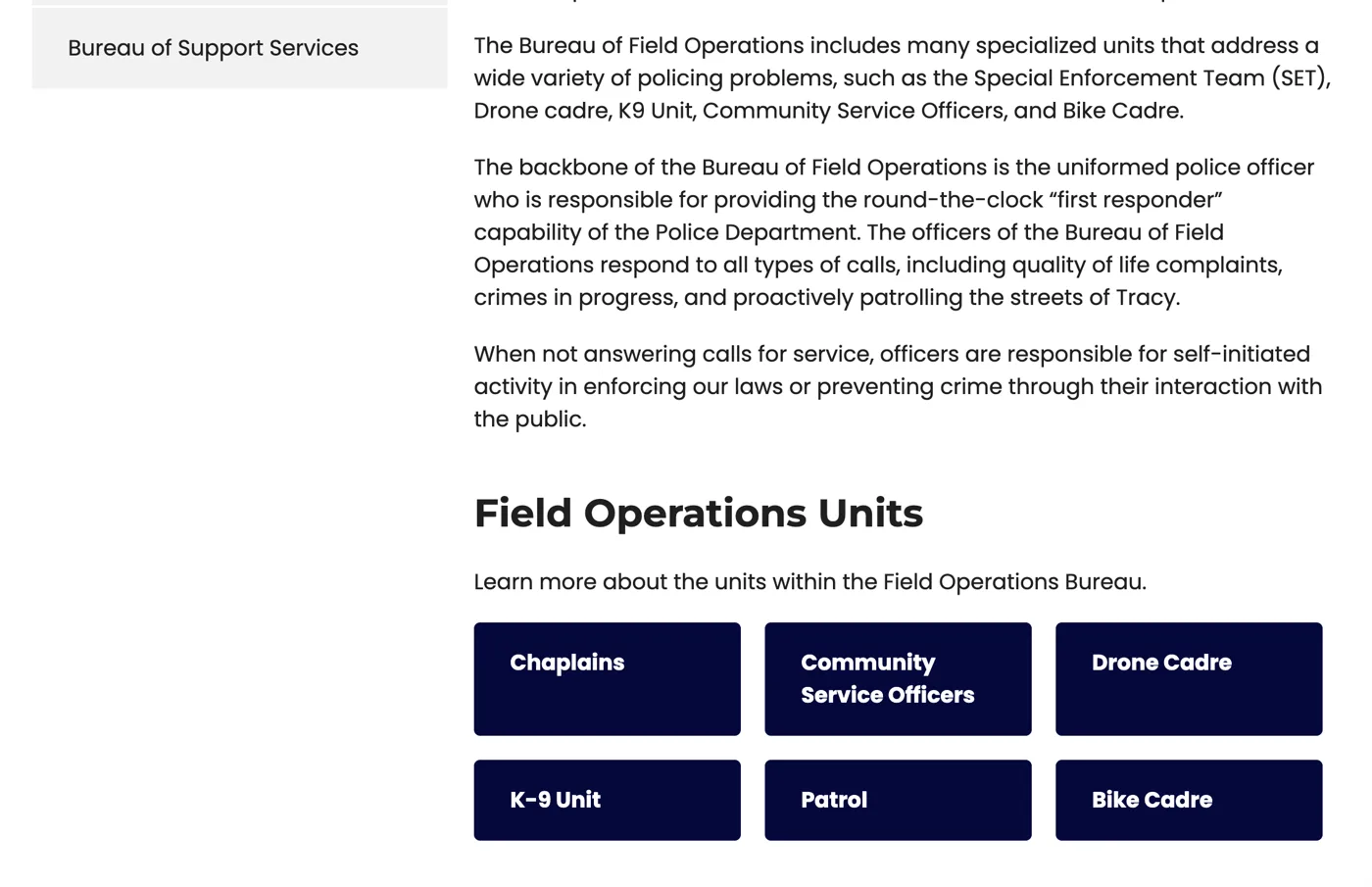
Field Operations Units grid with six tiles: Chaplains, Community Service Officers, Drone Cadre, K-9 Unit, Patrol, Bike Cadre
04Unit tiles under the bureau overview

Community

Give the dogs their own cards

The K9 page introduces each dog with a photo card, then answers recurring public questions in an accordion FAQ, so the page stays short but complete.
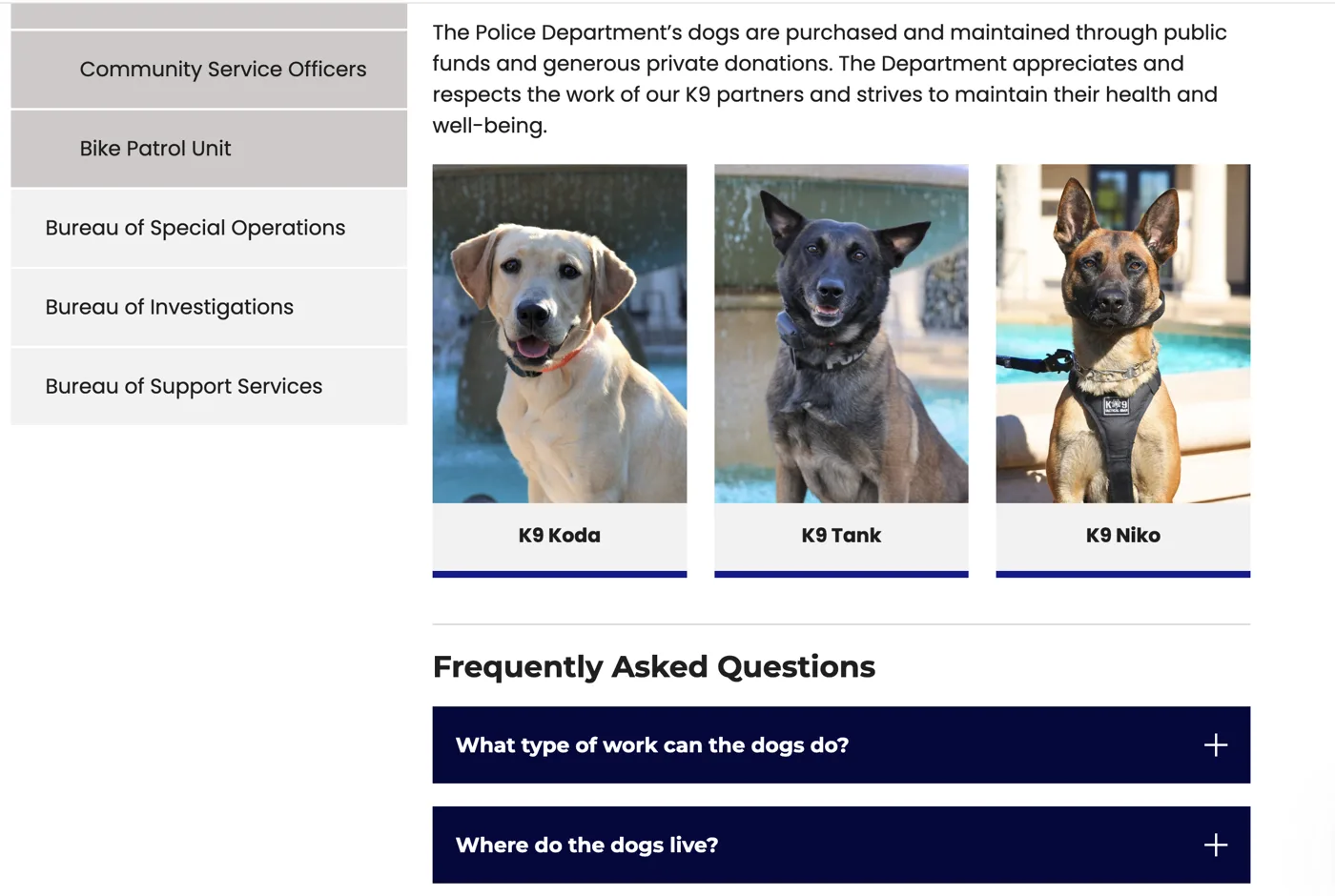
K9 profile cards for Koda, Tank, and Niko above a Frequently Asked Questions accordion
05Profile cards + FAQ accordion
← All work

Case study / Service design

Public Records Requests

Redesigning the City Clerk's records request page so residents know the fastest way to ask, what happens after they do, and what it will cost.

Role
UX design, accessibility audit & build
Platform
Granicus OpenCities
Process
HTML mockup → audit → CMS build
Partner
City Clerk's Office
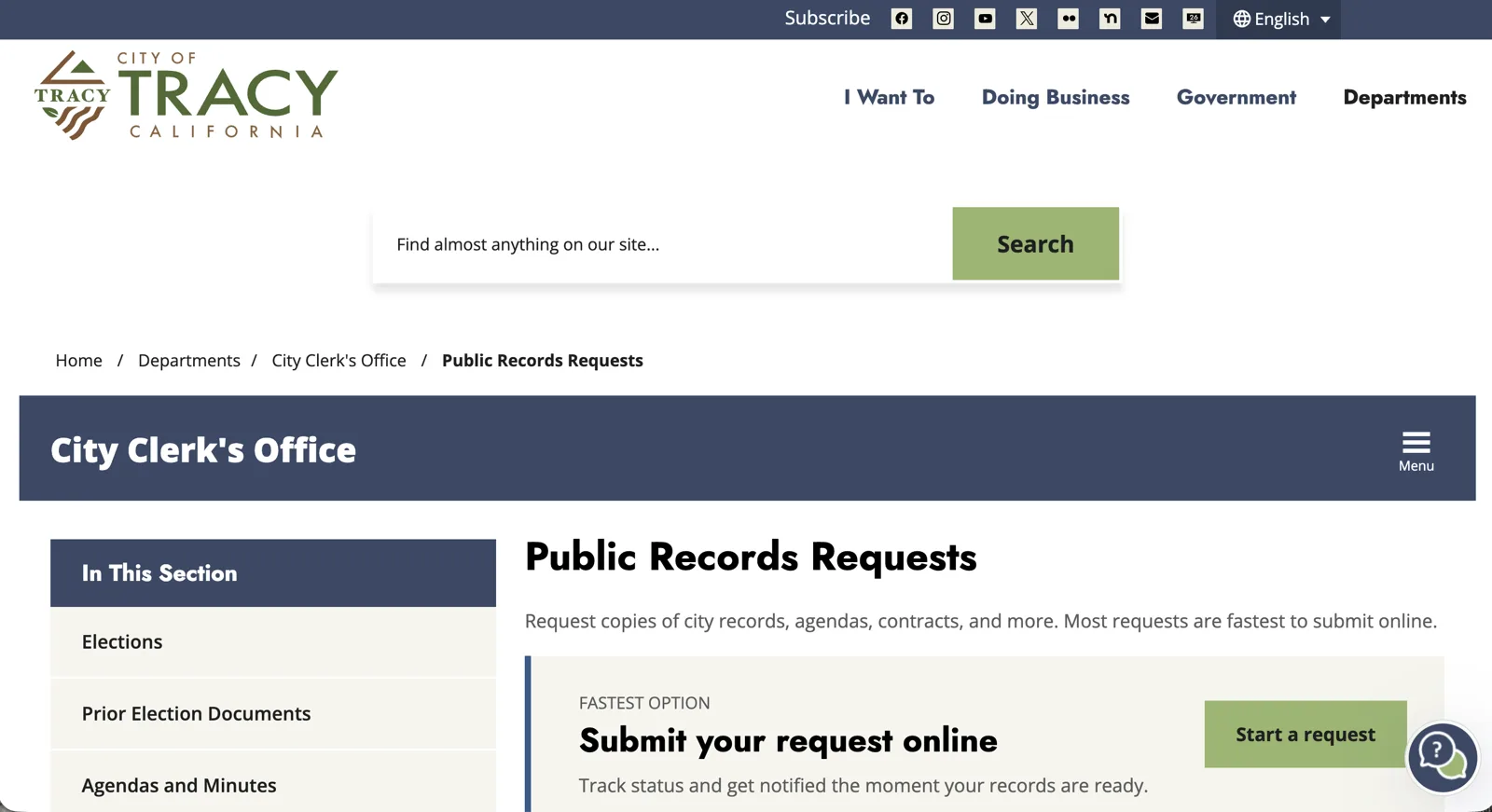
Redesigned Public Records Requests page on the new City of Tracy site: breadcrumb, City Clerk's Office banner, section menu, a one-line summary, and a Fastest option panel with a Start a request button
00Redesigned page

The problem

The old page opened with a paragraph of 1975 legislative history. The four ways to submit were one bulleted list, with the online portal given the same weight as mailing a letter. Fees and office hours were buried in long paragraphs, and nothing told people what would happen after they asked.

Every unclear step turns into a phone call or email to the Clerk's Office. The goal was a page that answers those questions before anyone has to ask.

Before / after
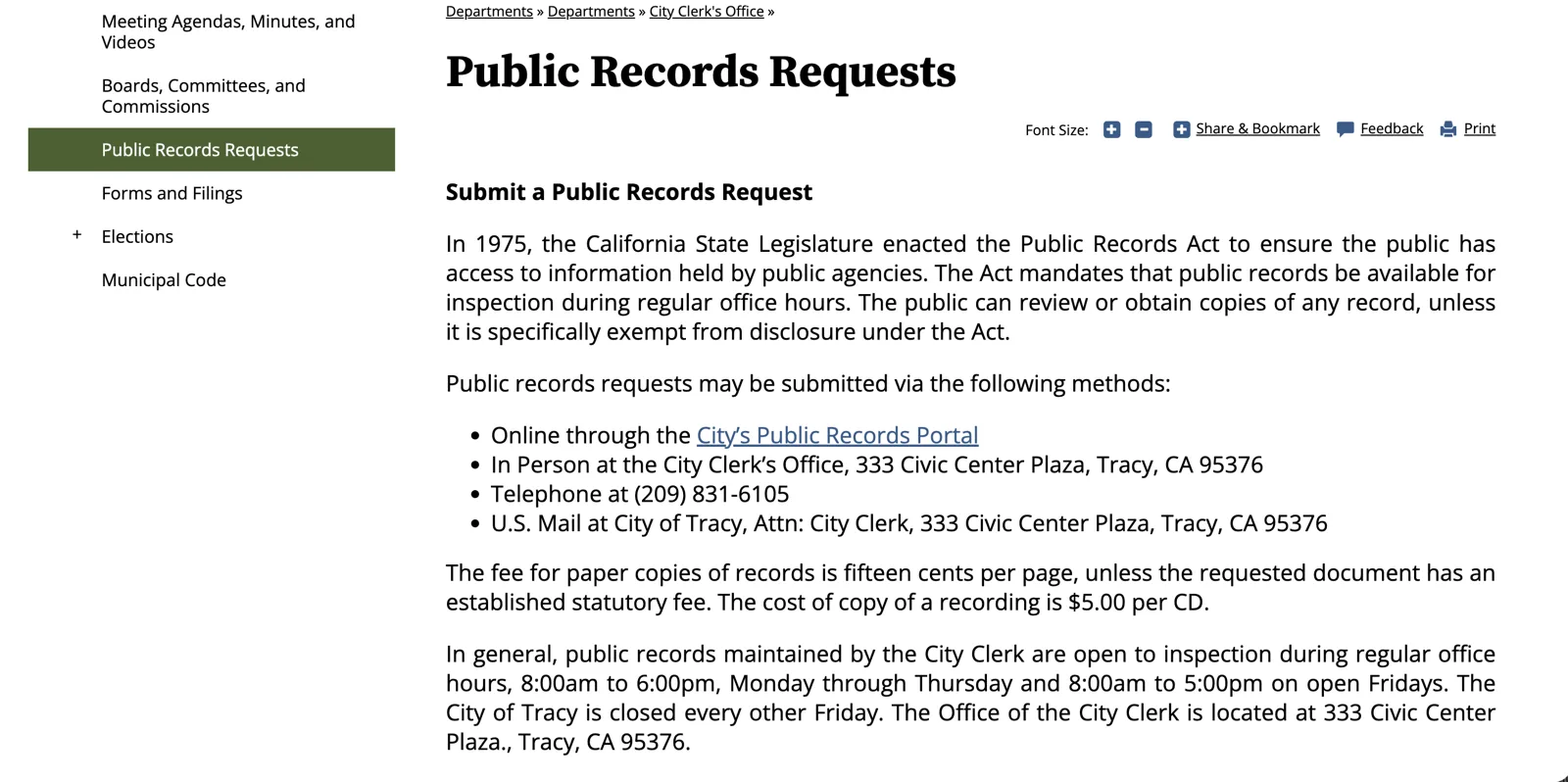
Same content, reorganized around the task

Old Public Records Requests page: a paragraph about the 1975 Public Records Act, a bulleted list of four submission methods, and fees and office hours written as paragraphs
BeforeOld site
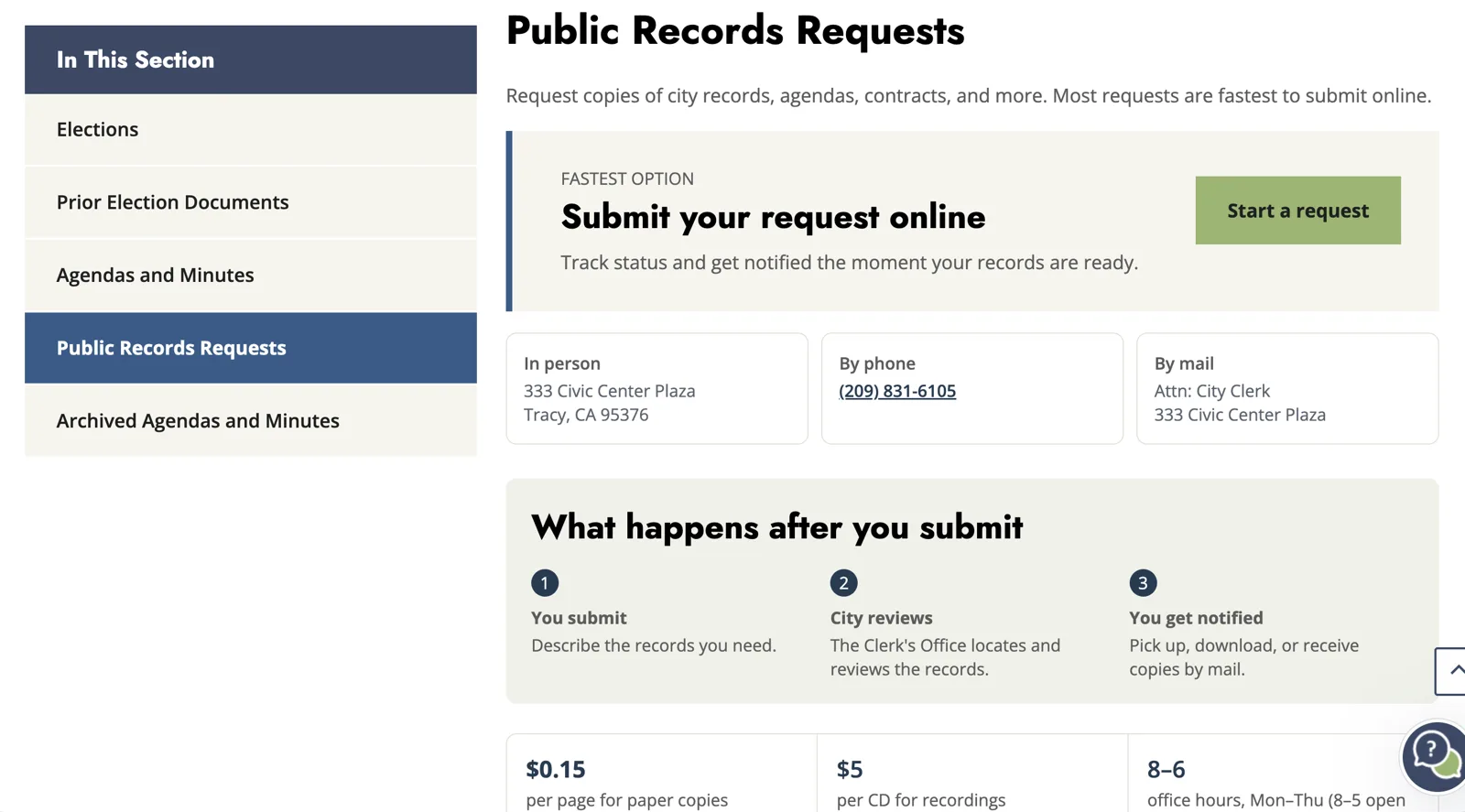
Redesigned page: a Fastest option panel with a Start a request button, three contact cards, a three-step process, and fee and hours figures
AfterNew site
  • Purpose before historyA one-line summary of what you can request replaces the legislative background as the opening.
  • One clear first stepThe portal moved from one bullet among four to the page's only button, with the other methods as cards beneath it.
  • Numbers you can scanCopy fees, recording fees, and office hours went from sentences to short figures.
  • A new "what happens next"The old page never said what happens after you submit. The new one shows the three steps.

Hierarchy

One recommended path, three backups

The online portal is fastest for residents and for staff, so it gets the only button on the page and a "Fastest option" label. In-person, phone, and mail stay available as equal-weight cards right below, so nobody is shut out.
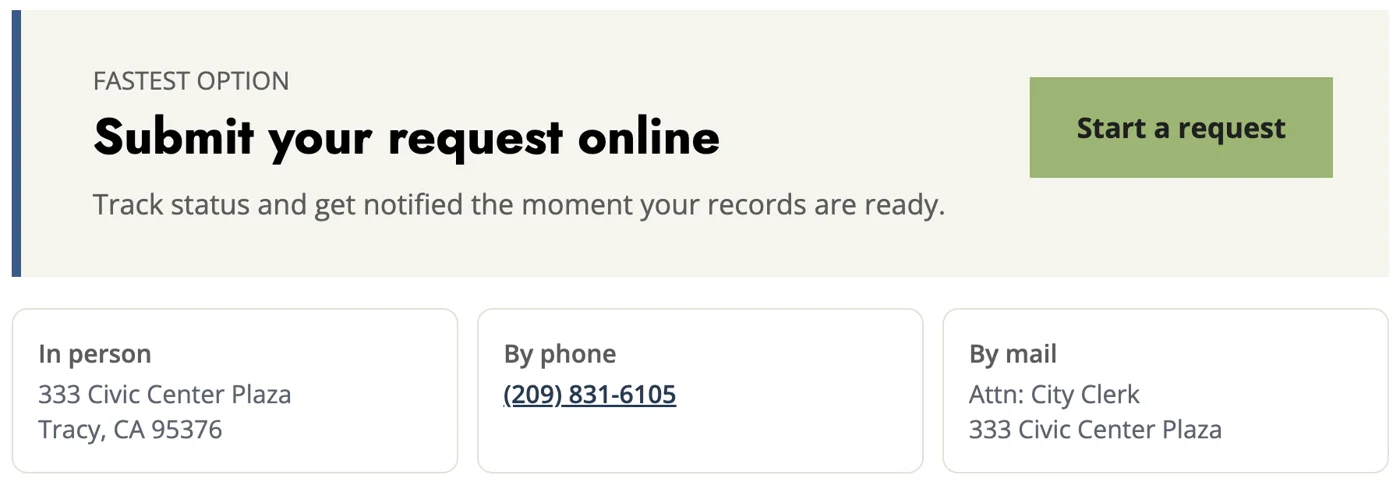
Fastest option panel reading Submit your request online with a Start a request button, above three cards for in person, by phone, and by mail
01Primary action + alternatives

Expectations

Explain what happens next

A three-step sequence (you submit, the city reviews, you get notified) answers "now what?" before it becomes a follow-up call. The numbering is real here: it's the actual order of the process.
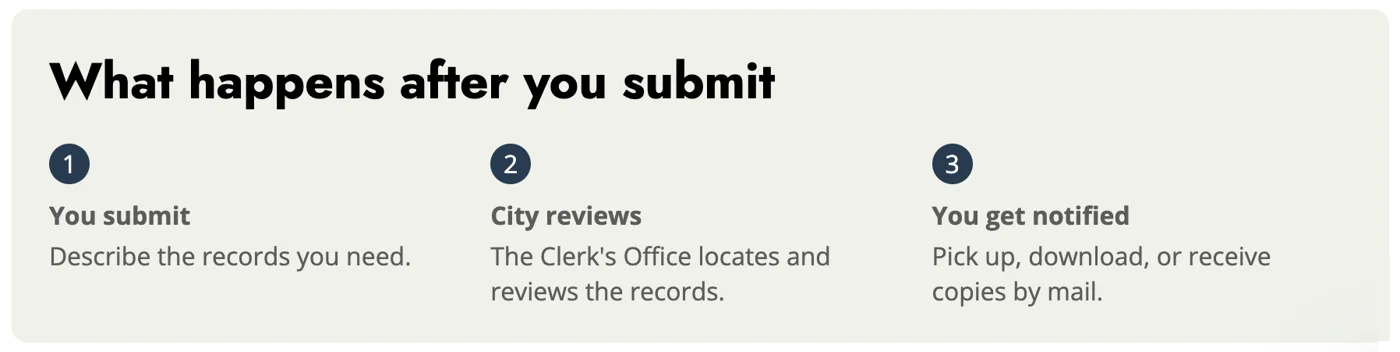
What happens after you submit: 1 You submit, 2 City reviews, 3 You get notified
02Three-step process

Process

Mockup, audit, then CMS

I built the page first as a full HTML mockup to settle layout and content with the Clerk's Office. Then I ran an accessibility audit on it, and rebuilt the final version inside OpenCities using only the city's built-in CSS classes, so staff can maintain it without custom code.

Paper copies
$0.15 / page
Recordings
$5 / CD
Office hours
Mon–Thu, 8–6